XT.com Deposit Not Received? How to Check Your Transaction Step by Step

Updated September 2026. If your XT.com deposit has not arrived, the first thing to know is that a withdrawal marked Completed or Success on the sending wallet or exchange does not automatically mean the funds have already been credited to XT. A crypto deposit normally passes through three stages: the sender broadcasts the transaction, the blockchain confirms it, and XT credits the deposit after its required confirmation threshold is reached.
This guide shows you how to diagnose a missing or delayed XT.com deposit step by step without guessing. You will learn how to find the transaction ID, check the blockchain, verify the network and deposit address, review confirmation requirements, identify Memo/Tag problems, and decide when the issue needs XT support.
Why an XT.com Deposit Can Be Delayed
According to XT’s Help Center, blockchain deposits involve three separate steps: withdrawal from the sender, block confirmation, and crediting on XT. This distinction explains why a transfer can show as completed on the sending exchange while still being absent from your XT balance.
The most common causes are:


- The transaction has not yet reached the number of blockchain confirmations required by XT.
- The network is congested and blocks are confirming slowly.
- The sender used the wrong blockchain network.
- The deposit address was incorrect or belonged to another chain.
- A required Memo, Tag, or Payment ID was missing or incorrect.
- The token, contract address, or network is not supported for deposits on XT.
- The blockchain transaction failed before reaching XT.
- The blockchain succeeded, but the deposit requires manual review or recovery.
XT’s official deposit tutorial specifically warns users to select a network supported by XT and make sure it matches the network used by the sending wallet or exchange. See the official XT.com deposit guide.
Step 1: Confirm the Withdrawal Actually Left the Sending Platform
Open the wallet or exchange from which you sent the crypto. Find the withdrawal record and check its status.
| Sender Status | What It Usually Means | What to Do |
|---|---|---|
| Pending / Processing | The sender may not have broadcast the transaction yet. | Wait or contact the sending platform. |
| Completed / Success | The sender says the transaction was broadcast. | Find the TxID and check it on-chain. |
| Failed / Rejected | The transfer did not complete successfully. | Contact the sending wallet or exchange. |
Do not rely only on the word Completed. The most useful evidence is the TxID or transaction hash because it lets you verify what happened directly on the blockchain.
Step 2: Find the Transaction ID (TxID or Hash)
A TxID is the unique identifier assigned to an on-chain transaction. Depending on the blockchain, it may also be called a transaction hash.
You can usually find it in the withdrawal history of the sending exchange or in the activity/history section of your wallet. Copy the full TxID exactly. Do not share private keys, seed phrases, or passwords with anyone while troubleshooting a deposit.
XT also provides a Help Center guide for checking transactions through a blockchain explorer: How to Check Crypto Transaction Status on the Blockchain Explorer.
Step 3: Check the Transaction on the Correct Blockchain Explorer
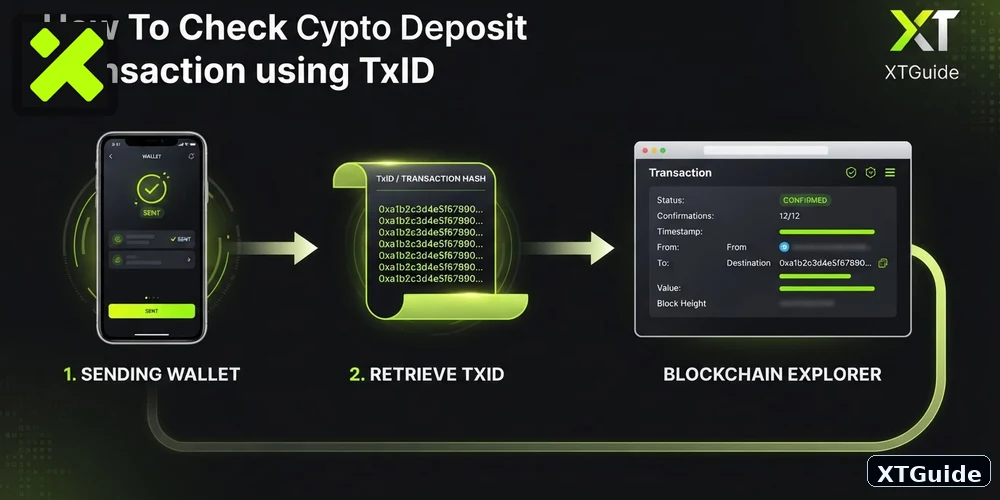
Paste the TxID into the explorer for the network you actually used. For example, an ERC-20 transaction should be checked on an Ethereum explorer, while transfers on Tron, BNB Smart Chain, Solana, Bitcoin, and other networks must be checked on their respective explorers.
Look for four details:
- Status: Success, Pending, Unconfirmed, or Failed.
- Destination address: It should match the XT deposit address you intended to use.
- Token and amount: Confirm the correct asset and quantity were sent.
- Confirmations: Check how many blocks have confirmed the transaction.
If the explorer shows Failed, the problem occurred before the funds reached XT. XT’s Help Center advises contacting the sender or the platform that initiated the withdrawal in this situation.
Step 4: Check XT’s Required Confirmations
Different assets and networks can require different confirmation counts before XT credits a deposit. XT says the current confirmation requirement for a specific cryptocurrency can be checked from that asset’s deposit page.
For example, XT’s current Help Center documentation gives BTC as an example where a deposit can be credited after one block confirmation, with additional confirmation requirements applying before withdrawal availability. Its confirmation guide also demonstrates that other networks and assets can have very different thresholds.
That is why there is no single universal answer to “How long does an XT deposit take?” A fast network may credit quickly, while congestion or a higher confirmation threshold can extend the wait.
Reference: XT.com deposit and withdrawal confirmation guide.
Step 5: Verify the Coin, Network and XT Deposit Address
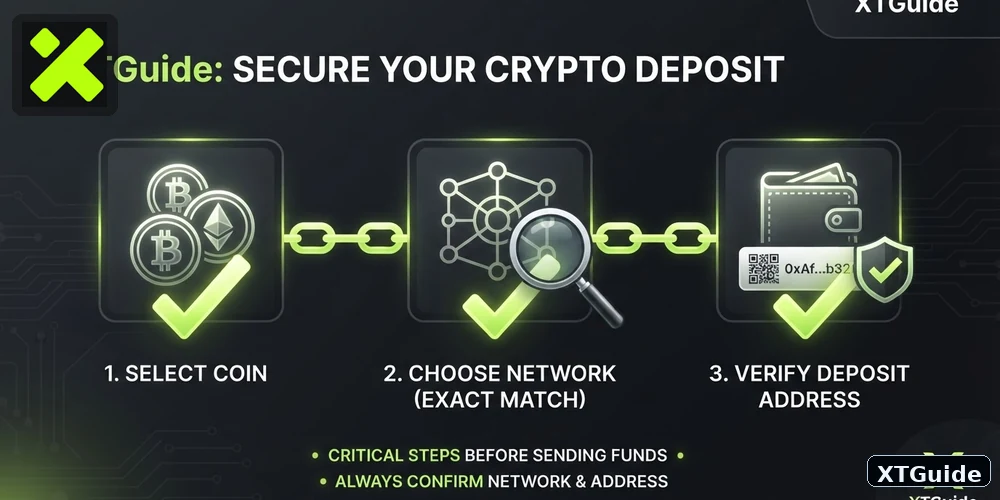
Now compare the transfer details with the deposit page inside XT.com.
Check all three:
- Coin: Did you send the exact asset supported on the XT deposit page?
- Network: Did the sending network match the network selected on XT?
- Address: Does the destination address shown on-chain exactly match your XT deposit address?
A network mismatch is one of the most serious deposit mistakes. For example, selecting one USDT network on XT but sending through a different chain can prevent automatic crediting and, in some cases, recovery may not be possible.
Whenever possible, copy the deposit address directly from XT rather than typing it manually, and verify the first and last several characters before sending.
Step 6: Check Whether the Coin Requires a Memo or Tag
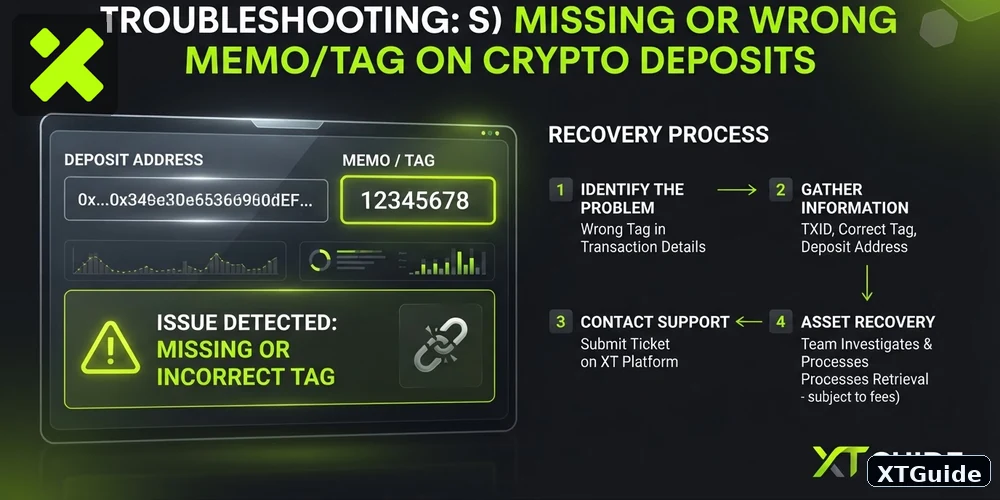
Some cryptocurrencies use a shared deposit address plus an additional identifier such as a Memo, Tag, or Payment ID. XT specifically cites assets such as XRP and XLM as examples where this additional identifier can be required.
If the Memo/Tag was omitted or entered incorrectly, the blockchain transaction may still show Success, but XT may not be able to automatically assign the funds to your account.
XT now provides a dedicated recovery process for deposits with a missing or incorrect Memo/Tag. The recovery request asks for information including the token, network, deposit amount and TxID, and may require additional proof of the source transaction.
See XT’s official Missing or Wrong Memo/Tag recovery guide.
Step 7: Check Your XT Deposit History
Log in to XT.com and open your assets or Spot Account area. XT’s Help Center says deposit records can be reviewed through the deposit history / View All area, where the related transaction hash and progress can also be checked.
Look for the deposit under the correct coin and network. Depending on its state, you may see it as processing, credited, or unavailable while the required confirmation threshold has not yet been reached.
If the blockchain already shows Success and sufficient confirmations but there is no corresponding credited deposit in your XT account, move to the support step below.
Step 8: Check for Minimum Deposit or Unsupported-Deposit Issues
Before sending crypto, review the live XT deposit page for that specific asset. Exchanges can apply minimum deposit amounts, supported networks, contract-address restrictions, or temporary deposit suspensions on a coin-by-coin basis.
Do not assume that because a token exists on XT, every blockchain version of that token is supported for deposits. Wrapped tokens, bridged assets, tokens with the same ticker but different contract addresses, and delisted assets can require special handling.
XT maintains an incorrect-deposit FAQ covering cases such as unsupported tokens, wrong contract addresses and Memo/Tag errors.
Step 9: When Should You Contact XT Support?
Contact XT support when the blockchain shows that the transfer succeeded and the required confirmation threshold has been reached, but the funds are still not credited to the correct XT account.
Prepare the following information before opening the support request:
- Coin/token name
- Network/chain used
- Deposit amount
- Full TxID / transaction hash
- Destination deposit address
- Approximate transfer time
- Screenshot or transaction record from the sending platform if requested
Providing the TxID is especially important because it allows support to verify the transaction directly on-chain. Start with XT’s official article Why Hasn’t My Deposit Been Credited? and follow the support route provided by XT if manual assistance is required.
XT Deposit Troubleshooting Checklist
| Check | If the Answer Is No |
|---|---|
| Did the sender broadcast the withdrawal? | Contact the sending platform. |
| Do you have a valid TxID? | Get it from the sender’s withdrawal history. |
| Does the explorer show Success? | If pending, wait; if failed, contact the sender. |
| Has XT’s confirmation requirement been reached? | Wait for additional confirmations. |
| Does the destination address match XT? | Treat it as an incorrect-address case. |
| Did you use the correct network? | Contact support and provide full transfer details. |
| Was a required Memo/Tag correct? | Use XT’s Memo/Tag recovery process. |
| Blockchain successful + confirmations complete + no credit? | Contact XT support with the TxID. |
How to Avoid Missing XT Deposits Next Time
- Open the XT deposit page immediately before every transfer and generate/copy the current address details.
- Match the network on both the sending platform and XT.
- Enter the Memo/Tag whenever XT displays one as required.
- Check any minimum deposit shown for the selected asset and network.
- Send a small test transaction first when moving a large amount to a new address.
- Keep the TxID until the deposit has been credited.
If you also need to move funds in the opposite direction, read our XT.com withdrawal guide, including withdrawal fees, limits and pending-transfer troubleshooting. For mobile users, see our XT.com app download and usage guide.
Exclusive XT Sign-Up Benefits
Unlock Exclusive XT Benefits
Sign up through XT’s exclusive link to get trading fee discounts, a $50 welcome bonus, and up to $8,000 in trading capital.
For a full onboarding walkthrough, see How to Register on XT.com. You can also compare trading costs in our XT.com fees guide.
Frequently Asked Questions
Why does my XT deposit say completed on the sending exchange but not show in XT?
Completed on the sending platform usually means the withdrawal was broadcast successfully. The transaction may still need more blockchain confirmations before XT credits it.
How do I know whether my XT deposit is still confirming?
Copy the transaction ID from the sending wallet or exchange and open it in the correct blockchain explorer. Compare the confirmation count with the requirement shown on XT’s deposit page for that asset and network.
What if my transaction shows Failed?
If the blockchain transaction failed, XT did not receive a successful on-chain transfer. Contact the wallet or exchange that initiated the transaction.
What if the transaction is successful but my XT balance is still missing?
If the destination address and network are correct, the blockchain shows success, and XT’s required confirmations have been reached, contact XT support and provide the TxID, token, network, amount and deposit address.
Can XT recover a deposit sent without a Memo or Tag?
XT provides a dedicated recovery request process for missing or incorrect Memo/Tag deposits. Recovery depends on the individual transaction and is not guaranteed, so follow XT’s official recovery instructions and provide all requested evidence.
What if I used the wrong network?
Do not send another transaction to try to fix the first one. Save the TxID and full transfer details, then contact XT support. Recovery depends on whether XT can technically access and support the assets on the network used.
Bottom Line
When an XT.com deposit is not received, start with the blockchain rather than repeatedly refreshing your account balance. Confirm that the sender actually broadcast the transaction, obtain the TxID, check the on-chain status, compare the confirmation count with XT’s current requirement, and verify the token, network, address and Memo/Tag.
If the transaction failed, contact the sender. If it is still confirming, wait for the required confirmations. If it succeeded on-chain with the correct details and enough confirmations but is still not credited, contact XT support with the full transaction information.
Security note: XT support or any legitimate exchange support team should never need your wallet seed phrase or private key to investigate a deposit. Never share them.